NobcodeNobcode Lab1.1
NEWNow in the Microsoft Store

Your AI lab.
On your computer.

Nobcode Lab brings Code Lab and its AI agent to your desktop and connects them to the real world: cameras, PLCs and robots. Build vision flows, train your own AI models and keep your data on your machine.

Free with your Nobcode AI accountWindows · macOS · VS Code

Works with your languages, devices and protocols

The real app

See Nobcode Lab in action

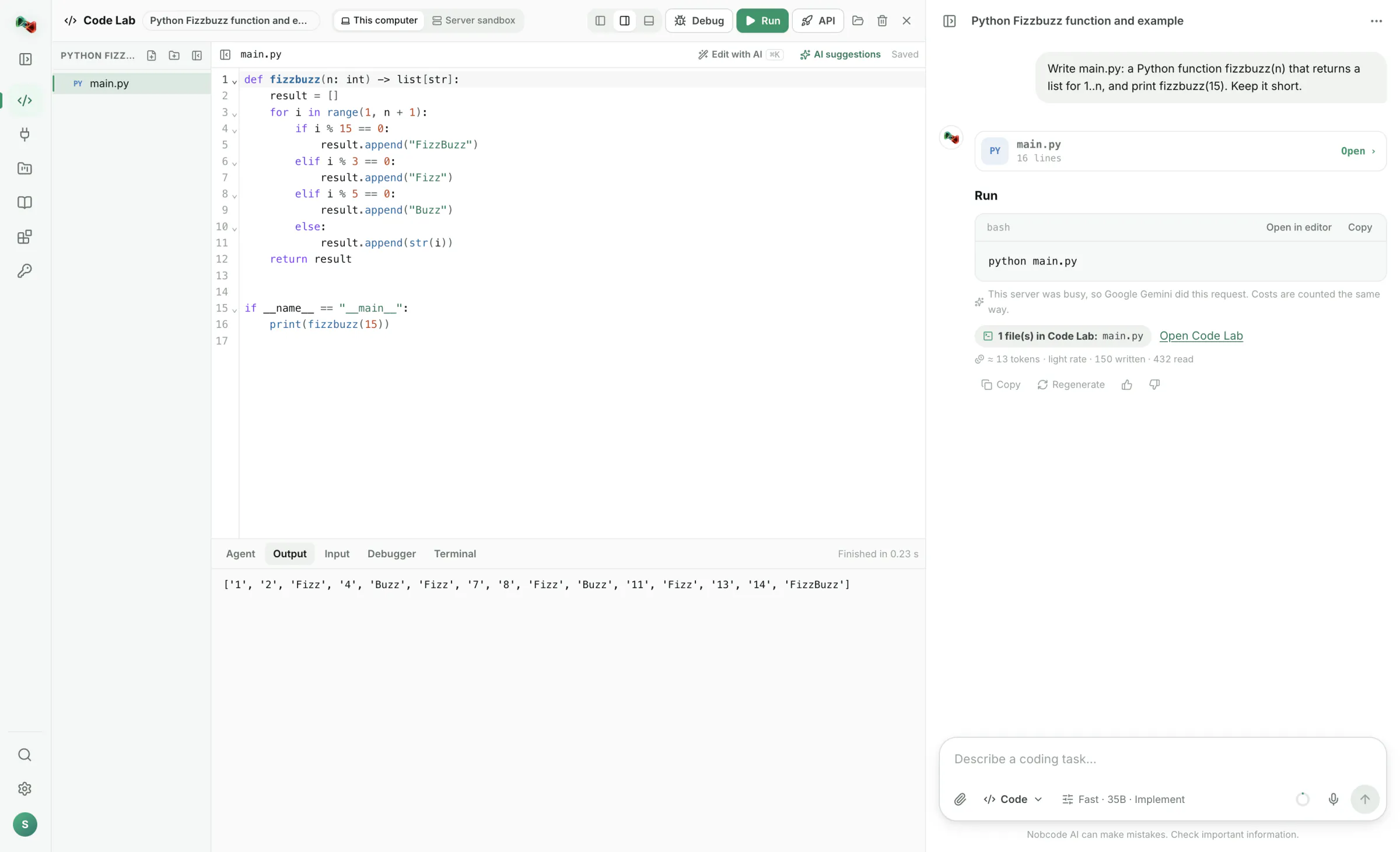
It opens on Code Lab with the AI chat on the right. Right below it, Integrations hold your devices, flows and models. Light or dark, like your system.

Code Lab in Nobcode Lab: the AI wrote a Python program and it ran on this computer
AI writes the code, you run it on your own computer 1 / 8
What's inside

From a line of code to a running machine

Everything you love about Nobcode AI's Code Lab, plus what only an app on your own computer can do.

Code Lab on your computer

Your tools. Your packages. Your terminal.

Run code on your own machine instead of a sandbox: pip, Go modules, OpenCV, your camera and your network, all just work.

  • Run Python, JavaScript, TypeScript, Go, C and C++, Rust, Java, C#, PHP, Ruby, SQL and shell scripts with the tools you already have.
  • A real terminal in your project folder.
  • Open a folder on your computer: changes go both ways, and a file changed on disk is never overwritten.
AI agent

An AI agent that asks before it acts

Describe a task. The agent plans it, reads and edits your files, runs the code, fixes what it broke and sums up what it did.

  • Every command needs your OK, in a dialog of the app itself that shows exactly what will run.
  • Every change as a diff, with undo per file or all at once.
  • Project rules in AGENTS.md that the agent always follows.
Devices

Cameras, PLCs and robots, one click away

Add a device in four ways: the camera of your computer or a USB camera, a search of your network, a catalogue of real PLCs, robots and cameras, or simulators of a PLC, a camera and a robot arm when no hardware is at hand. Then watch its live values every 10 to 100 ms.

  • Talks to OPC UA, Siemens S7, Modbus TCP, Universal Robots, ROS and ROS 2, IP cameras (HTTP, MJPEG, RTSP), serial RS-232/RS-485 and CAN; EtherNet/IP and Beckhoff ADS beta.
  • Reading is free; writing is guarded. A device only writes or moves after you arm it, for at most 60 minutes, and “Disarm all” is always one shortcut away.
  • Use them by name in your code: the Python and JavaScript libraries read and write PLC values, take camera pictures and move robots.
  • Import L5X, GSDML, ESI, EDS and OPC UA NodeSet files, and calibrate your cameras.
Flows

Vision and logic, without glue code

Connect a camera, image steps and your PLC in a visual flow. Or describe it in one sentence and let the Flows assistant build it with you.

  • Start from a template: inspect parts with a camera, measure them in millimetres or react to a PLC value, then decide OK or NOK and act on it.
  • Run it on a trigger: by hand, a timer, a PLC handshake, a TCP message, an OPC UA call or a live stream, with OK/NOK counts and the live picture.
  • Use it from your code with ready clients for Python, TypeScript, JavaScript, C#, C++, Go, Java and Rust, or export it as Python or C++ with OpenCV.
  • Versions, tests and a preview that never writes or moves anything.
Your own AI models

Teach it what matters on your line

Take a few pictures, mark what you see and train a model on your own computer. No GPU and no cloud needed: the pictures never leave your machine.

  • Four kinds: find objects, sort pictures, find defects (it learns from good parts only) and predict from data, from a CSV file or values recorded from a device.
  • Guided screens: collect examples from a camera, draw boxes, train, check the results, try it live.
  • Use it everywhere: as a step in a flow or with a few lines of Python.
Model library

16 free pretrained models, one click each

See what a model can do, how big and fast it is and its licence before you download it. Try it on a sample or your camera, then make it yours with your own classes.

Find objects

SSDLite · Faster R-CNN · RetinaNet

80 everyday objects, from 13 MB.

BSD-313–167 MB
A7-42 K
Read text

EasyOCR

Labels, serial numbers and signs in English and German.

Apache-2.0100 MB
Depth

Depth Anything V2

A depth map from a single camera picture.

Apache-2.099 MB
Faces & words

YuNet · CLIP

Find faces, or sort pictures by classes you just type in.

MIT0.2–605 MB

Also: MobileNetV3, EfficientNet, ResNet-50, ConvNeXt, DeepLabV3 and LR-ASPP. Free licences only.

You're never alone

Ask the AI to set it all up

“Connect my laptop camera and show me where the yellow boxes are.” Code Lab's AI picks the right model, adds the camera, writes the program and opens a live view. Nobcode Lab asks you before every change.

  • Real actions through the nobcode command: devices, models, flows.
  • Live view windows for programs that show what the camera sees.
  • A “No” is final. The AI then asks what you want instead.
Private by design

Your computer stays yours

Nobcode Lab is built so that what happens on your machine stays there unless you decide otherwise.

Pictures stay local

Camera pictures never go to the AI or to other computers.

Folders aren't uploaded

Folders you open from your computer stay on your computer.

Cloud only with your yes

Cloud AI models are used only after you agree, and you can switch them off.

No telemetry

No tracking. Only a small log for troubleshooting stays on your computer, and key files and secrets are never read into Code Lab.

Get started

Up and running in three steps

  1. Get it from the Microsoft Store

    Free for Windows 10 and 11 on Intel/AMD or ARM, and it keeps itself up to date. Installers for Windows and Mac are below.

  2. Sign in with your browser

    Click “Sign in”, confirm once in your browser, and the app is ready. No password typed into the app.

  3. Open a folder or add a device

    Run your code locally, or add your camera and ask the AI what to build first.

Download

Get Nobcode on your computer

Nobcode Lab for Windows and Mac, and Nobcode AI for VS Code. Free to install with your Nobcode AI account; Code Lab and the AI features are part of Premium.

Windows

1.1

Windows 10 and 11 on Intel/AMD or ARM. Signed by Microsoft and kept up to date by the Store. Devices, Flows, your own models and the model library included.

Or download the installer 1.1.1: Intel / AMD (x64) 124 MB · ARM64 119 MB

macOS

1.0.1

Code Lab on your Mac with your own tools and terminal. Devices, Flows and models come to Mac with version 1.1.

Version 1.1 for Mac is on its way

Nobcode AI for VS Code

0.2.0

Chat about your code, line help and inline completions in Visual Studio Code, and your Code Lab projects synced both ways with a folder on your computer. Works with Premium.

First start on WindowsFrom the Microsoft Store it installs like any other app. The installer from this page isn't signed yet: if SmartScreen appears, choose “More info”, then “Run anyway”.
First start on MacOpen the .dmg and drag Nobcode Lab to Applications. Then right-click the app, choose “Open” and confirm.
VS CodeSearch for “Nobcode AI” in the Extensions view, or install the .vsix in a terminal: code --install-extension nobcode-ai-0.2.0.vsix
Check the downloads (SHA-256)

Image processing and model training set themselves up with one click: they need Python 3.9 to 3.13 on your computer, and training downloads PyTorch and scikit-learn once.

FAQ

Questions and answers

What does Nobcode Lab cost?

The app is free with your Nobcode AI account, in the Microsoft Store and here. Code Lab, the AI agent and the Flows assistant are Premium features, like on the web, and the VS Code extension works with Premium too.

Microsoft Store or installer: which one should I take?

The Microsoft Store, if you can: Windows installs it without a warning and the Store keeps it up to date. The installer on this page is the same app for PCs without the Store; it isn't signed yet and asks you to update when a new version is out.

Where is the normal chat?

Nobcode Lab is made for code and machines. It opens on Code Lab, with Code Lab's AI chat on the right, and Integrations (devices, flows and models) come right after it. The plain chat, images and 3D stay on ai.nobco.de in your browser, with the same account.

What is the difference to Code Lab in the browser?

In the browser, code runs in a sandbox on our server. In Nobcode Lab it runs on your computer with your own tools, packages, files, camera and network, and you get devices, flows and your own AI models on top.

Can the AI control my machines?

The AI can read values and prepare devices and flows, and you confirm every change. It can't arm a device, write to a PLC or move a robot by itself: writing and moving only work while you have armed the device.

Do I need a GPU for training?

No. Models train on your processor. Pretrained networks make this fast: a small picture classifier is ready in seconds. Object detectors take longer, depending on how many pictures you use.

When will version 1.1 come to Mac?

Soon. Until then the Mac version 1.0.1 gives you Code Lab with your own tools, terminal and folders. Nobcode Lab tells you when an update is ready.

Why does Windows warn me when I install it?

Only the installer from this page does: it isn't signed with a certificate yet, so SmartScreen doesn't know it. Take Nobcode Lab from the Microsoft Store instead, or check the installer with its SHA-256 checksum above before you run it.

Do I need Nobcode Lab for the VS Code extension?

No. The extension works on its own: it brings the Coding AI into VS Code, opens your Code Lab projects as folders and keeps them in sync both ways. You sign in to your Nobcode AI account from VS Code.